Showing posts with label Cherry Mobile Fusion Fire. Show all posts
Showing posts with label Cherry Mobile Fusion Fire. Show all posts
Cherry Mobile Fusion Fire stock rom/firmware to unbrick your tablet.
Im done uploading the stock rom / firmware for Cherry Mobile Fusion Fire. This tablet has a Action Chip. The tools and firmware are downloadable below. You can also follow my tutorial.

First, Download the Firmware Here
Download Here
Pad Product Tool --> Download Here
After Downloading, extract the files and Install Pad Product Tool 1.05. The driver is already included in the Pad Product Tool, so it will automatically install the driver for your device.
After installing the Pad Product Tool. Launch the Pad Product Tool 1.05. It should be located in your Desktop or Go to START > All Programs > Actions Tools > Pad Product Tool
The first time you launch it it will look for the ".fw" extension. Just look inside the firmware folder, or which folder you extracted the firmware. After loading the file just click on replace button.
Pictures below are example only, but the same procedure.


And then add the system.img, rec.img, system.img. apk.img (see picture for your reference)
It automatically load the files if you extract the .fw and .img in one folder.

And press Down after you connect your tablet in computer. The Down button will be activated after you connect your tablet in the computer. Just a reminder do not exit the PAD Product Tool when it is flashing. This might brick your tablet and rendering it unuseable.

NOTE: When connecting your tablet in your computer press Volume down or Volume up then plug in your usb.
I hope this tutorial will help you solve your problem. If you have any question just leave a comment below.
Read more »
First, Download the Firmware Here
Download Here
Pad Product Tool --> Download Here
After Downloading, extract the files and Install Pad Product Tool 1.05. The driver is already included in the Pad Product Tool, so it will automatically install the driver for your device.
After installing the Pad Product Tool. Launch the Pad Product Tool 1.05. It should be located in your Desktop or Go to START > All Programs > Actions Tools > Pad Product Tool
The first time you launch it it will look for the ".fw" extension. Just look inside the firmware folder, or which folder you extracted the firmware. After loading the file just click on replace button.
Pictures below are example only, but the same procedure.
And then add the system.img, rec.img, system.img. apk.img (see picture for your reference)
It automatically load the files if you extract the .fw and .img in one folder.
And press Down after you connect your tablet in computer. The Down button will be activated after you connect your tablet in the computer. Just a reminder do not exit the PAD Product Tool when it is flashing. This might brick your tablet and rendering it unuseable.
NOTE: When connecting your tablet in your computer press Volume down or Volume up then plug in your usb.
I hope this tutorial will help you solve your problem. If you have any question just leave a comment below.

Hard Reset your Cherry Mobile Fusion Fire to remove password, pattern lock, gmail account
Hey,
This tutorial is for Cherry Mobile Fusion Fire. Hope this will help your fix your tablet :)
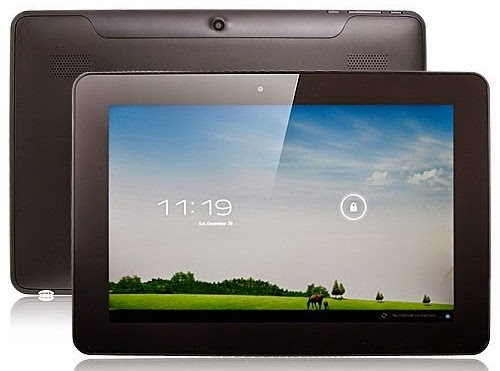
Hard resetting / factory resetting your tablet will solve the following issues:
1. If you forgot your pattern lock
2. If you forgot your gmail account
3. If you forgot your password
4. Apps that automatically force closing
5. Stuck in Cherry Mobile Logo / Fusion Fire Logo(sometimes does not work if the firmware is totally damage)
NOTE: Performing hard reset will erase your data.
To hard reset:
1. Turn off your tablet.
2. Press and Hold VOLUME DOWN + Power button (for about 10 seconds). When it power up, release the POWER Button. Keep pressing and holding VOLUME UP until you see an Android with exclamation mark.
3. Press the HOME Button (Forth button from left to right, next to VOLUME UP) to reveal Android System Recovery.
4. Select wipe data / factory reset. Then select YES -- delete all user data. To navigate press the VOLUME ROCKER, to confirm your selection PRESS VOLUME UP
4. Reboot your phone.
Note:
If performing hard reset did not succeed, you need to wipe the cache first in the android system recovery before performing wipe / factory reset.
I hope this tutorial helps you.. If you have any question just drop a
comment.
Read more »
This tutorial is for Cherry Mobile Fusion Fire. Hope this will help your fix your tablet :)
Hard resetting / factory resetting your tablet will solve the following issues:
1. If you forgot your pattern lock
2. If you forgot your gmail account
3. If you forgot your password
4. Apps that automatically force closing
5. Stuck in Cherry Mobile Logo / Fusion Fire Logo(sometimes does not work if the firmware is totally damage)
NOTE: Performing hard reset will erase your data.
To hard reset:
1. Turn off your tablet.
2. Press and Hold VOLUME DOWN + Power button (for about 10 seconds). When it power up, release the POWER Button. Keep pressing and holding VOLUME UP until you see an Android with exclamation mark.
3. Press the HOME Button (Forth button from left to right, next to VOLUME UP) to reveal Android System Recovery.
4. Select wipe data / factory reset. Then select YES -- delete all user data. To navigate press the VOLUME ROCKER, to confirm your selection PRESS VOLUME UP
4. Reboot your phone.
Note:
If performing hard reset did not succeed, you need to wipe the cache first in the android system recovery before performing wipe / factory reset.
I hope this tutorial helps you.. If you have any question just drop a
comment.
Subscribe to:
Posts (Atom)
